
Memorial Guide
Passed Pet to LEGO Portrait: A Memorial Guide
Honoring a passed pet with a custom LEGO-compatible mosaic is a deeply meaningful DIY tribute. When an animal passes, owners search for lasting ways to remember them. A brick art portrait captures their likeness, fur tones, and personality in a physical display. This guide explains how to crop photos, simplify backgrounds, and source bricks affordably.
Direct answer: A successful pet memorial mosaic focuses on eye clarity, tight cropping of the face, and background removal (Magic Cut) to isolate the pet and reduce costs. Map fur colors into real brick shades, export a parts list for Webrick/BrickLink, and display it in a sturdy frame.
Best for: Pet owners, family members, and friends seeking a creative, personal, and lasting way to remember a deceased cat, dog, or other companion animal.
Avoid: Hobbyists seeking quick animal decals or prefab kits without custom design planning.
Recommended setup: Crop the image tightly to focus on the pet's face, use Magic Cut to strip away background noise, and source flat plate pieces via Webrick to keep the memorial build under $50.
Who This Guide Helps
Pet owners, family members, and friends seeking a creative, personal, and lasting way to remember a deceased cat, dog, or other companion animal.
Who Should Skip It
Hobbyists seeking quick animal decals or prefab kits without custom design planning.
Bottom Line
Crop the image tightly to focus on the pet's face, use Magic Cut to strip away background noise, and source flat plate pieces via Webrick to keep the memorial build under $50.
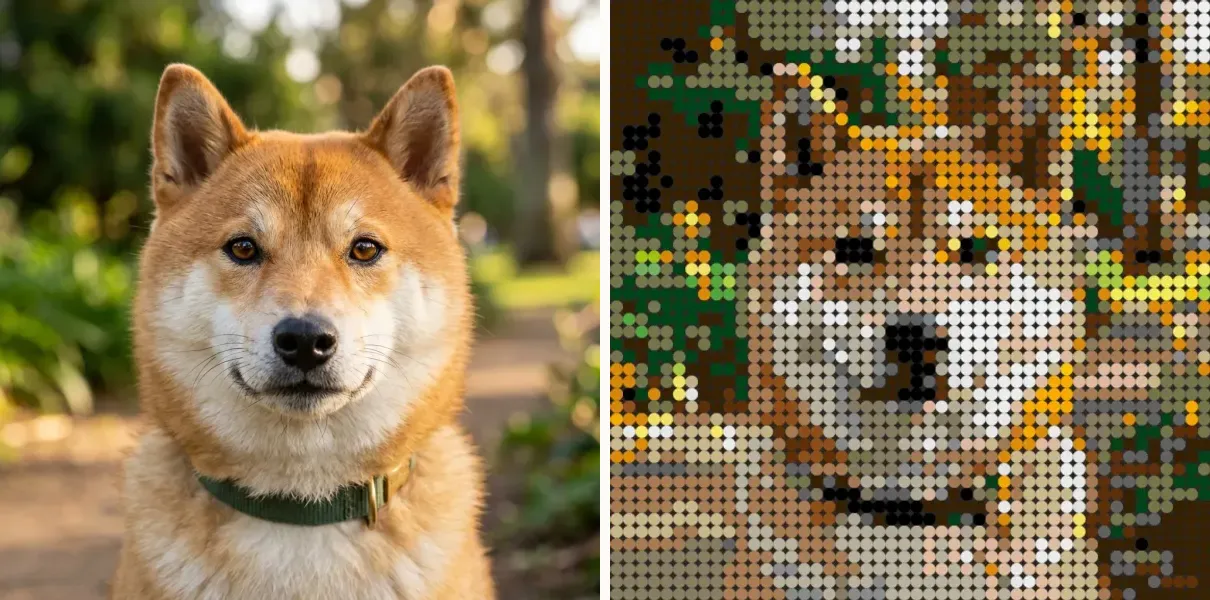
Key elements of a lasting pet memorial build
A memorial mosaic should feel intimate and accurate. Pay attention to these visual dimensions during planning:
Eye highlights
A pet's expression and soul are captured in the eyes. Select a photo where light reflects in the pupils to avoid a flat or lifeless look in the pixel grid.
Fur tonal separation
For dark or light-furred pets, ensure the photo has enough shadow detail to separate the muzzle, brow, and cheek planes, preventing the face from merging into a single color blob.
Background isolation
Remove grass, furniture, or outdoor clutter. Isolating the head and shoulders creates a focused, professional portrait that honors the pet without distraction.
Sturdy display
Memorial mosaics deserve long-term protection. Plan to mount the baseplate to a rigid backing board and place it in a dust-proof frame for permanent display.
Pet memorial planning matrix
Use this matrix to make decisions on sizes, parts, and backgrounds for a pet tribute.
| Planning step | Best practice | What it avoids | Why it matters |
|---|---|---|---|
| Image Selection | Close-up face photo | Unrecognizable pixelation | Facial details are key to pet likeness. |
| Background Mode | Magic Cut (Removed) | High brick counts & costs | Saves up to 60% on background brick purchases. |
| Grid Scale | 48x48 studs (beginner) | High cost or excessive effort | The sweet spot for a single pet face keepsake. |
| Part Style | Square 1x1 plates (3024) | Awkward texture gaps | Aligns perfectly for fur texture representation. |
Common pet memorial planning mistakes to avoid
Avoid these common pitfalls when designing your custom tribute build:
Using a full-body distant photo
At 48x48 resolution, a full-body photo makes the pet's face only 8-10 pixels wide, completely erasing their eyes, nose, and recognizable expression. Focus on a tight crop of the face.
Forgetting to remove background noise
A busy background wastes budget on green/brown background bricks, leaving fewer color shades available for the pet's fur details. Always simplify or remove backgrounds.
Underestimating display stability
Large baseplates warp easily over time when hung without support. Always mount to a solid backing board or fit the build into a dedicated deep-set frame.
Selecting the perfect tribute photo: The eye highlight rule
The eye highlight rule is the single most critical factor in determining whether a pet memorial mosaic succeeds or fails. Owners recognize their pets through the eyes before any other facial feature. When converting a photo to a pixel grid, a pet's eyes can quickly shrink to just a 2x2 or 3x3 square of studs. If the original photo lacks clear catchlights (the reflection of light in the pupils), the resulting pixel rendering will look flat, lifeless, or even slightly blind.
To prevent this, select a photo taken in natural daylit conditions where the light source is in front of the pet. The pupils should contain distinct white or light highlights. Avoid photos with 'red-eye' or 'green-eye' reflections from a camera flash, as these produce muddy colors in the final mosaic palette. If you are choosing between multiple memories, always favor the one with the clearest eye expression over the one with the best posture or setting.
Background isolation: Using Magic Cut to save budget and focus attention
A common planning mistake is leaving the background intact. Grass, furniture, and wall colors introduce unnecessary visual noise that dilutes the color allocation of the mosaic generator. The color quantization algorithm has a limited budget of shades. If it has to dedicate tan, green, or brown tones to backgrounds, it leaves fewer gradient shades available for the subtle shadows of your pet's fur.
By using the Magic Cut (Smart Skip) feature in the BMBrick workspace, you can isolate the pet's head and shoulders. This tool marks background pixels as skipped, meaning they are excluded from the final parts count and PDF instructions. This simple step can reduce the total pieces required for a 48x48 build from 2,304 down to 1,000–1,200 pieces. This does not just make the build cleaner—it directly lowers the cost of materials by avoiding the purchase of hundreds of background bricks that serve no design purpose.
- Isolate the face: Magic Cut works best when the background has a distinct color difference from the pet's fur.
- Save parts cost: Skipping the background reduces the required brick count by 40% to 60% on average.
- Focus the tribute: A neutral skipped background creates a classic portrait format that highlights the pet's likeness.
Sourcing parts under $50: The Webrick route workflow
Building a custom LEGO-compatible memorial portrait does not need to be expensive. If you source all 2,304 pieces of a 48x48 mosaic through official LEGO Pick a Brick (PAB), the parts alone will cost over $138, and shipping can add further delay. To keep the project under a strict $50 budget, the Webrick sourcing route is highly recommended.
Webrick offers 1x1 plates (compatible with LEGO part #3024) for approximately $0.015 to $0.02 per piece. Combined with a 48x48 stud baseplate, the entire bill of materials for a pet portrait can be sourced for $30 to $45, depending on the exact color distribution and your shipping location. To utilize this route, follow this simple workflow:
- Export the parts list: Once your preview is optimized in BMBrick, click the export button and download the Webrick CSV file.
- Upload to Webrick: Go to Webrick's Part Tool page and upload the CSV file directly. The tool will automatically match the shades to Webrick's inventory.
- Select the baseplate: Add one 48x48 baseplate (#4186) or four 32x32 baseplates (#3811) to your cart.
- Review and checkout: Verify that all required quantities are in stock in the square-plate style before completing your purchase.
How to evaluate the product honestly
The most honest way to evaluate a tool like BMBrick is to stop asking whether the preview is impressive and start asking whether the overall workflow gets safer, clearer, and more worth building. A strong product should improve the quality of the decision before the money is spent, not merely flatter the user into spending it. That means the crop should become easier to judge, the cost should become easier to understand, the sourcing should become less chaotic, and the final build should feel more approachable instead of more mysterious.
If a product claim sounds good but does not change any of those downstream realities, it probably is not a meaningful advantage. The useful test is always the same: does this feature help the user make a better project, or does it only make the marketing page easier to believe? BMBrick is strongest when it is held to that standard, because the product is designed around decisions that still matter after the initial excitement wears off.
- Judge the workflow from source image to wall display, not just the first render.
- Check whether the product reduces practical risk, not only aesthetic uncertainty.
- Use the guide library as evidence that the claims stay coherent across real project decisions.
The quickest way to pressure-test the promise is to move straight into Pet Portrait 48x48 Case and Choose the Right Photo. If the claims still hold there, the product story is probably grounded in the real workflow.
How BMBrick supports pet memorial creations
Free crop and preview to test likeness before ordering any parts.
Magic Cut tool runs offline in browser to remove background elements instantly.
Generates Webrick CSV and BrickLink XML parts list matching real part colors.
Detailed PDF instruction booklet with modular 16x16 pages for stress-free building.
FAQ
How much does a custom pet memorial mosaic cost?
The BMBrick digital blueprint is a limited-time $1 launch offer, normally $9.90. Sourcing the parts on Webrick for a 48x48 size (2,304 pieces) costs approximately $30 to $45, making it a very affordable custom memorial.
How long does it take to build a 48x48 memorial?
A 48x48 mosaic takes between 3 to 5 hours of relaxed building. It is a peaceful, therapeutic process that makes a wonderful commemorative activity.
Which part style is best for fur texture?
Square 3024 plates are recommended. The continuous surface of square plates helps represent the dense texture of cat or dog fur much better than round tiles, which leave visible grid gaps.
Where To Go Next
Next reads: