
Planning Guide
How Many LEGO Pieces Do I Need for a Mosaic?
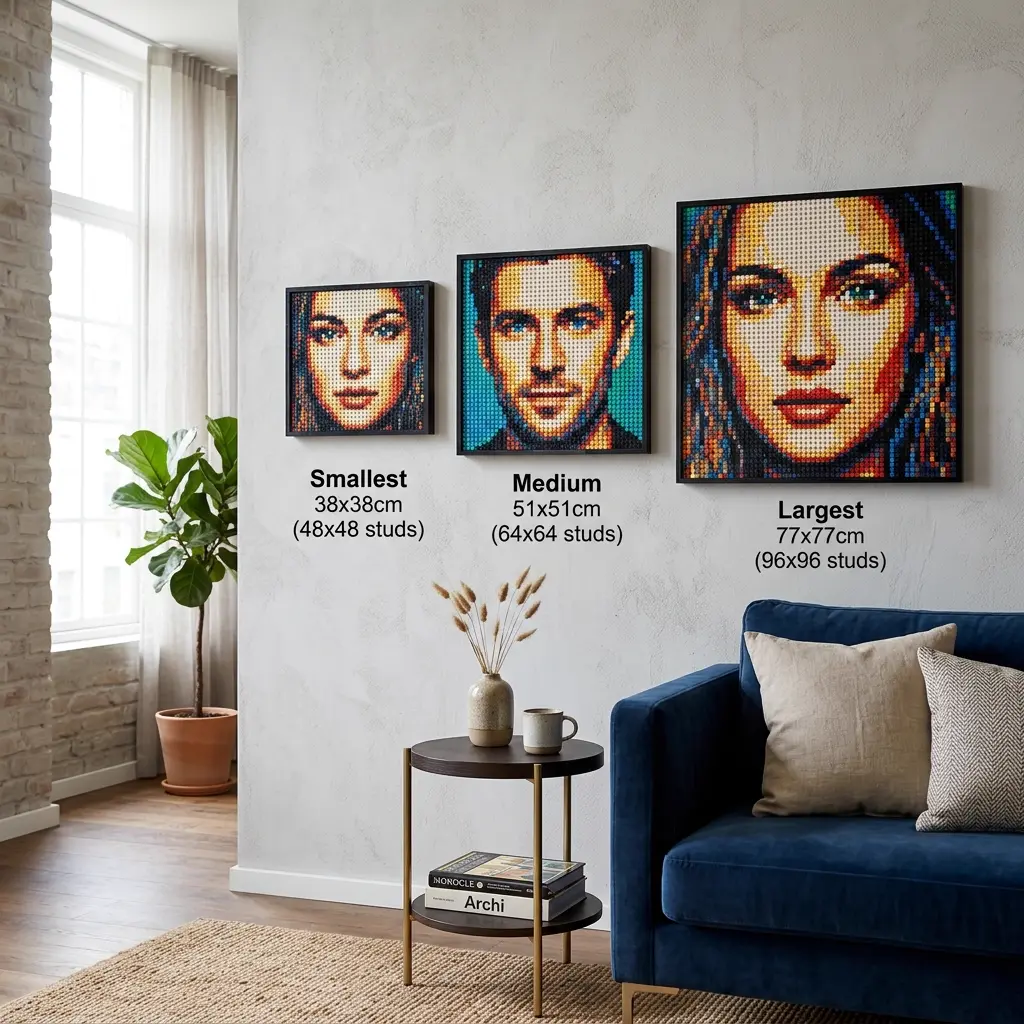
Generate a free photo mosaic preview, then calculate pixel parts as width × height minus skipped cells. A fully filled 48×48 grid uses 2,304 pieces; 64×64 uses 4,096; 96×96 uses 9,216. This guide retains the complete size table so you can compare counts, approximate physical dimensions, dated 3024 route estimates, and build effort before buying the digital plan or physical parts.
Direct answer: A flat mosaic needs one 1×1 pixel part per active cell: width × height − skipped cells. Without skips, 48×64 needs 3,072 parts and 64×64 needs 4,096. At the April 2026 catalog's 3024 assumptions, those cost $184.32–$245.76 via LEGO PAB or $92.16–$122.88 via Webrick, before hardware, tax, and shipping. Test the crop free; complete personal PDF and parts exports are paid.
Best for: This guide helps anyone budgeting a mosaic project, especially first-time buyers, gift planners, and builders trying to decide whether a medium or large size is actually worth it.
Avoid: If you already know the exact board dimensions and are simply waiting for the final export, this article may be more strategic than you need.
Recommended setup: A 48×48 mosaic (2,304 pieces, ~$138) delivers a clean result for simple subjects. Jump to 64×64 (4,096 pieces, ~$246) for portraits that need more detail. Only go 96×96+ when the subject genuinely benefits from the extra resolution.
Who This Guide Helps
This guide helps anyone budgeting a mosaic project, especially first-time buyers, gift planners, and builders trying to decide whether a medium or large size is actually worth it.
Who Should Skip It
If you already know the exact board dimensions and are simply waiting for the final export, this article may be more strategic than you need.
Bottom Line
A 48×48 mosaic (2,304 pieces, ~$138) delivers a clean result for simple subjects. Jump to 64×64 (4,096 pieces, ~$246) for portraits that need more detail. Only go 96×96+ when the subject genuinely benefits from the extra resolution.
What changes piece count the fastest
Piece count is not random. Four project decisions control it directly.
Final dimensions
Going from 48×48 (2,304 pieces) to 64×64 (4,096 pieces) adds 78% more parts. Going to 96×96 (9,216 pieces) quadruples the original count. Make sure the added area improves the subject, not just the background.
Background commitment
Background cells cost as much as subject cells in a uniform-price route. In a hypothetical 64×64 plan with 1,600 background cells, those cells still need 1,600 parts unless you actually skip them. Inspect the mask and active count instead of assuming a typical percentage.
Subject isolation (Magic Cut)
A cut-out can simplify the image, but count only falls for actually skipped cells. For example, 4,096 cells minus 1,600 skipped cells leaves 2,496 pixel parts. A solid-color replacement background does not reduce the full 4,096-part count.
Crop tightness
A tighter crop on the subject often lets you use a smaller board size entirely. Cropping a full-body shot to head-and-shoulders might let you drop from 64×96 (6,144 pieces, $369) to 48×64 (3,072 pieces, $184) – half the cost for a stronger result.
Piece count by mosaic size — the complete table
Every row assumes a full grid with no skipped cells, one 3024 square plate per cell, and rounded USD pixel-part costs. Approximate dimensions use 8 mm stud spacing; build times are planning estimates, not measured completion promises. Catalog scope: BMBrick's data was verified April 6, 2026 and generated April 15, 2026. Prices are USD planning estimates from that snapshot, not live supplier quotes or stock guarantees. Physical bricks, base/support hardware, display hardware, tax, and shipping are separate from the paid digital blueprint.
| Size (studs) | Pieces | LEGO PAB ($0.06/pc) | Webrick ($0.03/pc) | Physical size (cm) | Build time est. |
|---|---|---|---|---|---|
| 48 × 48 | 2,304 | $138 | $69 | 38 × 38 | 3–5 hrs |
| 48 × 64 | 3,072 | $184 | $92 | 38 × 51 | 4–7 hrs |
| 48 × 96 | 4,608 | $277 | $138 | 38 × 77 | 6–10 hrs |
| 64 × 64 | 4,096 | $246 | $123 | 51 × 51 | 5–8 hrs |
| 64 × 96 | 6,144 | $369 | $184 | 51 × 77 | 8–13 hrs |
| 96 × 96 | 9,216 | $553 | $277 | 77 × 77 | 12–20 hrs |
| 96 × 144 | 13,824 | $829 | $415 | 77 × 115 | 18–30 hrs |
Where count estimates go wrong
Most inaccurate budgets come from treating piece count like a fixed fact instead of a design choice.
Assuming bigger is automatically better
Going from 48×48 ($138) to 96×96 ($553) quadruples the cost. That only makes sense if the subject genuinely needs 9,216 pieces to read well. Most portraits look great at 4,096.
Estimating cost before choosing the crop
The crop decides whether you are paying for the subject or for the environment around it. A full-body shot on a 64×96 board (6,144 pieces, $369) might become a head-and-shoulders on 48×64 (3,072 pieces, $184) with a better result.
Ignoring build time as part of the budget
A 96×96 mosaic takes 12–20 hours to place. That is 3–5 sessions for most people. A 48×64 at 3,072 pieces takes 4–7 hours – one focused weekend afternoon. Time is a real cost, especially for gifts with deadlines.
Trying to fix budget problems after export
Switching from LEGO ($0.06/pc) to Webrick ($0.03/pc) saves 50% on parts. But if you locked in a 96×144 build (13,824 pieces), even Webrick costs $415. The bigger lever is always size and crop, not sourcing.
How to choose between small, medium, and large
Most people do not need a large build for a meaningful result. A 48×64 portrait (3,072 pieces, $184 LEGO / $92 Webrick) is the sweet spot for first-time builders – enough detail for a recognizable face, manageable build time (4–7 hours), and a display size (38×51 cm) that works on most walls.
Small projects are best when the image is naturally graphic, the subject is bold, or the goal is a quick personal keepsake. Medium projects are the sweet spot for most portraits and gifts. Large projects are worth it when the subject genuinely benefits from more nuance and when the room, budget, and build energy can support them.
How Magic Cut changes the math
A solid replacement background still needs one piece per cell. Background removal and skipping are separate decisions: inspect the actual skip mask and active-cell total in the plan before reducing the inventory estimate. Magic Cut does not imply a universal percentage saving.
For a scoped example, a 64×64 grid with exactly 1,600 skipped cells uses 4,096 − 1,600 = 2,496 pixel parts. At the snapshot's $0.06 LEGO 3024 price the subtotal is $149.76, versus $245.76 for the full grid. At $0.03 Webrick it is $74.88, versus $122.88. Base/support hardware, tax, shipping, and the digital blueprint remain separate. Compare the complete cost guide once the active count is stable.
Project planning checklist
The best sequence is to make the irreversible decisions last. Each step narrows the cost range before you commit money.
For photo selection tips, start with Choose the Right Photo. For sourcing strategy, see PAB vs BrickLink. For managing long builds, read Anti-Fatigue Building.
- Pick your photo and crop tight on the subject — this alone can halve the piece count.
- Choose a board size from the table above. For most portraits, start at 48×64 (3,072 pieces, $184).
- Try Magic Cut if the background is busy, then verify actual skipped cells before counting a saving.
- Check your budget: LEGO at $0.06/pc or Webrick at $0.03/pc. A 4,096-piece build is $246 vs $123.
- Estimate build time: roughly 1 hour per 500–800 pieces for a first-time builder.
- Upload to BMBrick, preview the result, and adjust before you order.
How to use this guide as a real project checklist
A practical build guide is most valuable when it changes the order of operations, not just the level of confidence. The best sequence is to make the irreversible decisions last. Start with the source image or framing choice, confirm that the subject still reads, estimate whether the size and cost remain realistic, and only then worry about detailed sourcing or final presentation. That order protects you from solving downstream problems for an upstream decision that was never stable.
Most frustration comes from skipping that sequence. Builders often jump to the fun part too early, then discover that the image was weak, the size was unrealistic, or the build flow was harder than expected. Slowing down for one honest planning pass is usually the cheapest improvement available. It turns avoidable surprises into conscious trade-offs and makes the later build feel calmer rather than more complicated.
- Make one upstream decision at a time and do not lock the next step until the previous one feels stable.
- Test the project under the conditions that actually matter: real budget, real deadline, real display space, and real stamina.
- Use the follow-up guides as checkpoints, not as optional reading, whenever the project still feels uncertain.
For most builders, the best next pair of checkpoints is 48 vs 64 vs 96 Sizes and Choose the Right Photo. Those two reads usually expose whether the plan is genuinely ready for export or only emotionally tempting right now.
How BMBrick helps you plan
BMBrick shows active piece counts and catalog-based estimates with a free photo preview. The complete personal PDF and parts files require a paid digital blueprint unlock. Supplier carts determine current stock, tax, shipping, and the final physical total.
If you want a stronger budgeting workflow, use this article together with PAB vs BrickLink for sourcing strategy and Anti-Fatigue Building for the time-and-energy side of the decision.
FAQ
How many LEGO pieces do I need for a small mosaic?
A fully filled 48×48 mosaic uses 2,304 pixel parts, excluding its base/support structure. Subtract only actual skipped cells. At the April 2026 3024 catalog prices, pixel parts total $138.24 via LEGO PAB or $69.12 via Webrick before hardware, tax, shipping, and digital files.
How many pieces for a medium LEGO mosaic?
Medium mosaics range from 3,072 pieces (48×64 studs, $184 LEGO) to 4,096 pieces (64×64 studs, $246 LEGO). This is the sweet spot for portraits and gifts — enough detail for a recognizable face at a manageable cost and build time of 4–7 hours.
How much does a LEGO mosaic cost?
Parts cost depends on size and sourcing. From LEGO Pick a Brick at $0.06/piece: small (2,304 pcs) = $138, medium (4,096 pcs) = $246, large (9,216 pcs) = $553. From Webrick at $0.03/piece, all costs are halved. Shipping is additional.
What is a good first-project piece count?
3,000–4,500 pieces (48×64 to 64×64 studs). That range costs $184–$246 from LEGO or $92–$123 from Webrick, and takes 4–7 hours to build. It is enough for a detailed portrait without being overwhelming for a first-time builder.
Does more pieces always mean better quality?
No. A well-cropped 48×64 portrait (3,072 pieces) often looks better than a loosely framed 96×96 (9,216 pieces) where half the area is wasted on background. Composition matters more than raw count. Spend your budget on the subject, not on empty space.
Where To Go Next
Next reads: