
Gift Guide
Pet Photo to LEGO Mosaic: The Ultimate Guide
Pet portraits work beautifully as mosaics because animals often have strong facial identity and emotional meaning. They also fail easily when the eyes are too small, the fur becomes noise, or the crop keeps too much distracting environment. A successful pet portrait does not recreate every hair. It protects the signals that make the animal feel immediately familiar to the owner.
Direct answer: The best pet mosaics use a face-first crop, strong eye readability, and enough tonal control to separate fur planes without turning the coat into visual static. In BMBrick, Magic Cut can remove distracting backgrounds, route exports turn the portrait into a sourceable parts list, and the PDF blueprint keeps a memorial or gift build readable.
Best for: This guide helps pet owners, partners, and gift buyers choosing a cat, dog, or companion-animal portrait that will still feel personal once it becomes built wall art.
Avoid: If you are making a highly stylized animal graphic and do not care about likeness or fur behavior, this guide may be more portrait-specific than necessary.
Recommended setup: Keep the crop tighter than you first think, protect the eyes, and use the background only when it strengthens the pet's identity. In most cases, the face is the art.
Who This Guide Helps
This guide helps pet owners, partners, and gift buyers choosing a cat, dog, or companion-animal portrait that will still feel personal once it becomes built wall art.
Who Should Skip It
If you are making a highly stylized animal graphic and do not care about likeness or fur behavior, this guide may be more portrait-specific than necessary.
Bottom Line
Keep the crop tighter than you first think, protect the eyes, and use the background only when it strengthens the pet's identity. In most cases, the face is the art.
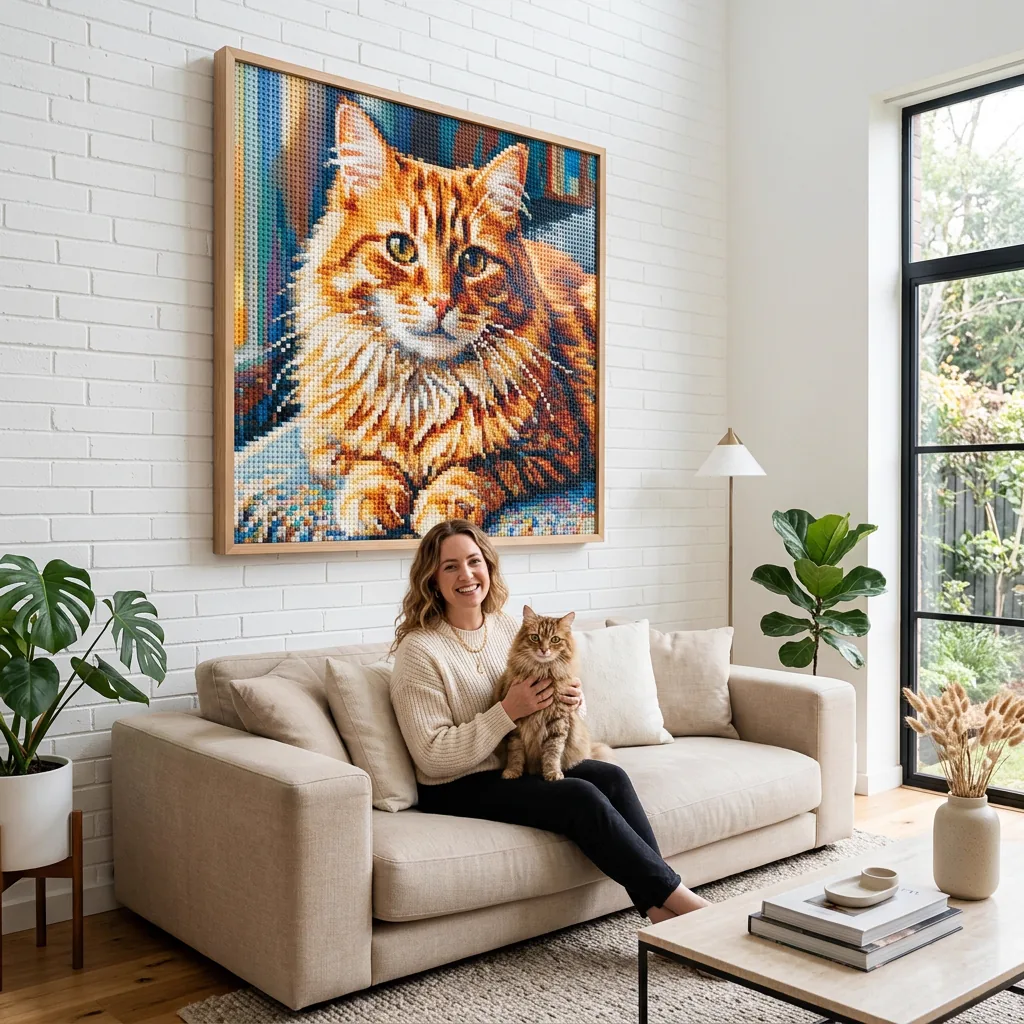
What makes pet portraits work so well in mosaics
Pet images succeed when the build protects the details owners actually recognize first.
Eye readability
Owners often recognize the pet through the eyes before anything else. If the eyes become too small or too muddy, the likeness drops sharply even when the rest of the face is technically accurate.
Fur plane separation
The goal is not to map every hair. It is to separate forehead, cheeks, muzzle, ears, and neck in a way that still suggests coat texture without visual chatter.
Background discipline
Busy indoor backgrounds and grass-heavy outdoor scenes often consume budget without helping the portrait. Most pet mosaics improve when the animal becomes more dominant in the frame.
Gift or decor context
A memorial portrait, a birthday gift, and a living-room pet artwork are not the same project. The emotional role of the piece changes how intimate, dramatic, or neutral the final composition should be.
Pet portrait planning table
Use this table when deciding how to balance likeness, cost, and display practicality.
| Decision | Safer choice | Riskier choice | Why it matters |
|---|---|---|---|
| Crop | Face-first portrait | Full-body scene | Face-first crops protect recognition. |
| Background | Simplified or removed | Detailed environment | Background often weakens focus and raises cost. |
| Size | Medium portrait | Large narrative scene | Portrait scale is usually enough for strong likeness. |
| Display | Framed wall piece | Loose board or improvised hang | A premium frame helps the gift feel complete. |
Pet portrait mistakes owners notice immediately
People forgive a lot in a pet portrait, but they rarely forgive the signals that make the animal no longer feel like their animal.
Letting the eyes shrink too much
The entire portrait can collapse emotionally if the eyes lose their clarity. This is usually a crop or scale problem, not a minor rendering problem.
Turning fur texture into random noise
Over-detailed fur can make a portrait feel fuzzy rather than lifelike. Good pet portraits suggest coat planes and key texture accents instead of mapping everything equally.
Choosing an action photo for a first portrait build
Action shots are often emotionally fun and structurally difficult. For a first project, a calmer headshot usually produces a more convincing result.
Forgetting display and hanging logistics
A premium pet portrait deserves more than a strong render. It also needs a frame and mounting plan that make it easy to keep on the wall long term.
How to pick the right pet photo
The best source images are usually eye-level or slightly above eye-level portraits where the animal's expression is clear and the background is not stealing attention. A pet running through a park can be a great memory photo and still be a weak mosaic source because the emotional read is spread across too much movement and environment.
Cats and dogs often benefit from tighter crops than people expect. Whiskers, ears, and muzzle shape can remain readable without the entire room or yard coming along for the ride. If you need a general source-image framework before choosing, start with Choose the Right Photo.
Handling fur, whiskers, and coat contrast
Fur is one of the biggest reasons pet portraits look expensive when handled well. The goal is not literal hair replication. It is tonal grouping. Separate the major light and dark planes, protect the eye and nose contrast, then let selective texture imply the coat instead of describing every strand.
This is especially important with black pets, white pets, or mixed coats where subtle value shifts carry the whole likeness. Strong palette logic often matters more than raw color count. For a deeper look at that side of the decision, compare with the mosaic color guide.
Sizing, framing, and gifting the finished portrait
Most pet portraits feel strongest at a moderate size that gives the face room without becoming unwieldy to hang. If the piece is a memorial or a major household focal point, a larger format may be worth it, but only if the photo truly benefits from the extra scale.
Once the framed work approaches 10kg or more, hanging becomes a real planning issue. Match the hardware to the wall type, use a rigid frame, and avoid assuming a sentimental piece can be treated like lightweight decor. A portrait this personal deserves secure display, not improvisation.
How to make the gift feel intentional instead of improvised
The strongest gift decisions are usually the simplest to explain in one sentence: why this image, why this size, and why this format for this specific person. If you cannot answer those three questions cleanly, the project is often still too vague. Gift mosaics become premium when they fit the recipient's life after the reveal, not just when they look dramatic for a moment at handoff. That is why room fit, frame quality, transport, and hanging safety all belong in the planning stage instead of being left for later.
Another useful test is to ask what the recipient will still appreciate a year from now. Will they love the intimacy of a tighter crop more than the documentary completeness of a wider scene? Will they prefer a finished framed piece, or would the blueprint become a more personal experience because they can build it themselves? The right answer is rarely the loudest or largest option. It is the option that keeps the emotional meaning while lowering the practical friction.
- Choose the version of the memory that is easiest to recognize and easiest to live with on a wall.
- Plan transport, framing, and hanging before treating the gift as "finished."
- When timing is tight, remember that a polished blueprint can be more thoughtful than a rushed physical piece.
If you want to verify that the gift still works from two adjacent angles, use Choose the Right Photo and LEGO Colors Guide before you lock the final plan.
How BMBrick supports a more convincing pet portrait
BMBrick is useful for pet portraits because it helps you test whether the face, eyes, and coat structure still read before you invest in a full order. Magic Cut, route estimates, square-versus-round material style, and the instruction PDF all matter when the emotional bar is high.
If you are deciding whether the project should be a wall-art centerpiece or a gift, pair this article with Wall Art Ideas and Why BMBrick to see how display quality and instruction quality reinforce the final experience.
FAQ
Are cats or dogs easier to turn into mosaics?
Either can work well. The clearer source image matters more than the species, though very dark coats or very busy fur patterns can require more care.
Should I keep the body or just the face?
Usually the face, unless the pet has a silhouette or pose that is central to the memory and still reads clearly at the chosen size.
Can a memorial portrait still work with a soft old photo?
Often yes, but only if the key facial signals remain readable. A smaller, calmer crop may be stronger than forcing the entire original scene.
How should I hang a larger framed pet portrait?
Use wall-rated hardware matched to the wall type, enough load margin, and a frame rigid enough to support the weight over time.
Where To Go Next
Next reads: